Top 5 Reasons to use Data Templates over Reports6i
To start off there are more than 5 reasons!
1. Displaying a reports in real-time
2. Advanced PL/SQL
3. Easy of use
4. Multiple Integration Points
5. No Binary Conversions
6. Used across multiple platforms
7. Integration with multiple data sources
8. Excellent debugging facilities
9. Eliminates Ambiguous Crashing (who doesn't love terminated by signal 11)
I forgot to mention a couple of other benefit about data templates vs reports6i that we haven't ever discussed. Data templates are the only way a developer can generate the xml in real-time in the eBusiness suite or locally on there pc. In comparison, a developer always has to submit a concurrent request in order to generate an xml file with reports6i.
Other benefits of using data templates would be that the logic has to be put into a pl/sql package, whice essentially makes the business logic globally available to all other objects in the database. This provides an amazing code reduction. Developers can create other data templates (that are similar but different) and reuse existing business logic.
Ike
Showing posts with label Data Templates. Show all posts
Showing posts with label Data Templates. Show all posts
Tuesday, January 20, 2009


Monday, December 1, 2008
BI Publisher: Data Templates - Simplified Error Handling
Debugging data templates and "calculated formulas"/"report triggers" can be tricky. This is especially true if a developer needs to test there queries in sql*plus or concurrent manager (what output utility should be used). Or what about user requests for putting error messages directly into format templates dynamically. Well there is a solution to all of these problems and yes you can have your cake and eat it too.
Now in the past I have talked up a storm about pipelined functions and how useful they are for reporting and not just etl. If you haven't read-up on pipelined functions I suggest you do so, you don't know what your missing out on! (see first article, second article)
Below is the outlined technical approach:
1. Pass in a debug parameter that specifies the debug output ie: DBMS, CONCURRENT, XML
2. In the beforeReportTrigger set the debugging method
3. Call a debugging procedure which is able to determine the right logging mechanism.
Now, I know what your thinking, this is way too simple, it can't be that easy. DBMS and CONCURRENT manager output mechanisms are straight forward but how would XML work. This where the pipelined function comes in. Click on the pic below. Notice what happens when the debug procedure finds that g_debug is set to xml. The debug procedure instead populates a pl/sql table, I wonder what were going to with that!

All one would need to do now is create a pipelined function to get the values out the table. Below is another code snippet.
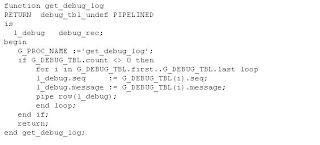
From there it's a simple one line query to get everything out of the pl/sql table:
SELECT seq, message FROM table(sample_pkg.get_debug_log) Click here to download the sample package pl/sql source code.
A couple of things to keep in mind. Because the debugging is parametrized an ebs developer can configure there concurrent program setup ie: set the default for the p_debug parameter to be "CONCURRENT". This is a really nice/flexible feature. As an example a developer could be running this same code locally in toad (or the BIPublisherIDE) and could change the output to DBMS or what have you with no worries because it's parametrized.....
For the reports6i developers you have to admit this sure beats the socks off of srw.message! So, why fight the feeling, make the switch :-)
Now in the past I have talked up a storm about pipelined functions and how useful they are for reporting and not just etl. If you haven't read-up on pipelined functions I suggest you do so, you don't know what your missing out on! (see first article, second article)
Below is the outlined technical approach:
1. Pass in a debug parameter that specifies the debug output ie: DBMS, CONCURRENT, XML
2. In the beforeReportTrigger set the debugging method
3. Call a debugging procedure which is able to determine the right logging mechanism.
Now, I know what your thinking, this is way too simple, it can't be that easy. DBMS and CONCURRENT manager output mechanisms are straight forward but how would XML work. This where the pipelined function comes in. Click on the pic below. Notice what happens when the debug procedure finds that g_debug is set to xml. The debug procedure instead populates a pl/sql table, I wonder what were going to with that!

All one would need to do now is create a pipelined function to get the values out the table. Below is another code snippet.

From there it's a simple one line query to get everything out of the pl/sql table:
SELECT seq, message FROM table(sample_pkg.get_debug_log) Click here to download the sample package pl/sql source code.
A couple of things to keep in mind. Because the debugging is parametrized an ebs developer can configure there concurrent program setup ie: set the default for the p_debug parameter to be "CONCURRENT". This is a really nice/flexible feature. As an example a developer could be running this same code locally in toad (or the BIPublisherIDE) and could change the output to DBMS or what have you with no worries because it's parametrized.....
For the reports6i developers you have to admit this sure beats the socks off of srw.message! So, why fight the feeling, make the switch :-)
Monday, October 15, 2007
BI Publisher: What the Lexical! Understanding why, when and how to use lexicals and bind variables correctly
Lexicals can be confusing for new developers. Lexicals & Bind variables are used in the following technology sets:
1. BI Publisher
2. Reports6i
3. SQL Scripts
4. PL/SQL
A bind variable is used for the assignment of value, a lexical is the literal value. The syntax is as follows for a bind variable :P_SEGMENT and the sytax for lexical is &L_WHERE_CLAUSE. Here’s how you would use the two of these in a query:
1. Select * from mtl_system_items where segment1 = :p_segment
2. Select * from mtl_system_items where &l_where_clause
Here are some neat tricks with lexicals and how they can be combined with bind variables. Below we can see that a lexical can contain a bind variable. This may seem confusing but it has major implications for the performance of your query.
Good:
l_where_clause := 'segment1 = :p_segment';
Bad:
l_where_clause := 'segment1 = '''p_segment'';
Appending segment1i s a bad idea because it causes a performance issue. Every time this query is parsed it needs to generate a new explain plan. So nothing gets cached. Where as the lexical with a bind variable is much better, because the statement gets cached.
The performance issue doesn’t really rear its ugly head until it gets in a production environment or this query is being executed in some sort of batch process.
That’s it, that’s all there is to lexical and bind variables.
Good Luck!
1. BI Publisher
2. Reports6i
3. SQL Scripts
4. PL/SQL
A bind variable is used for the assignment of value, a lexical is the literal value. The syntax is as follows for a bind variable :P_SEGMENT and the sytax for lexical is &L_WHERE_CLAUSE. Here’s how you would use the two of these in a query:
1. Select * from mtl_system_items where segment1 = :p_segment
2. Select * from mtl_system_items where &l_where_clause
Here are some neat tricks with lexicals and how they can be combined with bind variables. Below we can see that a lexical can contain a bind variable. This may seem confusing but it has major implications for the performance of your query.
Good:
l_where_clause := 'segment1 = :p_segment';
Bad:
l_where_clause := 'segment1 = '''p_segment'';
Appending segment1i s a bad idea because it causes a performance issue. Every time this query is parsed it needs to generate a new explain plan. So nothing gets cached. Where as the lexical with a bind variable is much better, because the statement gets cached.
The performance issue doesn’t really rear its ugly head until it gets in a production environment or this query is being executed in some sort of batch process.
That’s it, that’s all there is to lexical and bind variables.
Good Luck!
Subscribe to:
Posts (Atom)